Blog
BlogWhy I built 56 free developer and design tools that run entirely in the browser, how one data file drives them, and what I'd change.
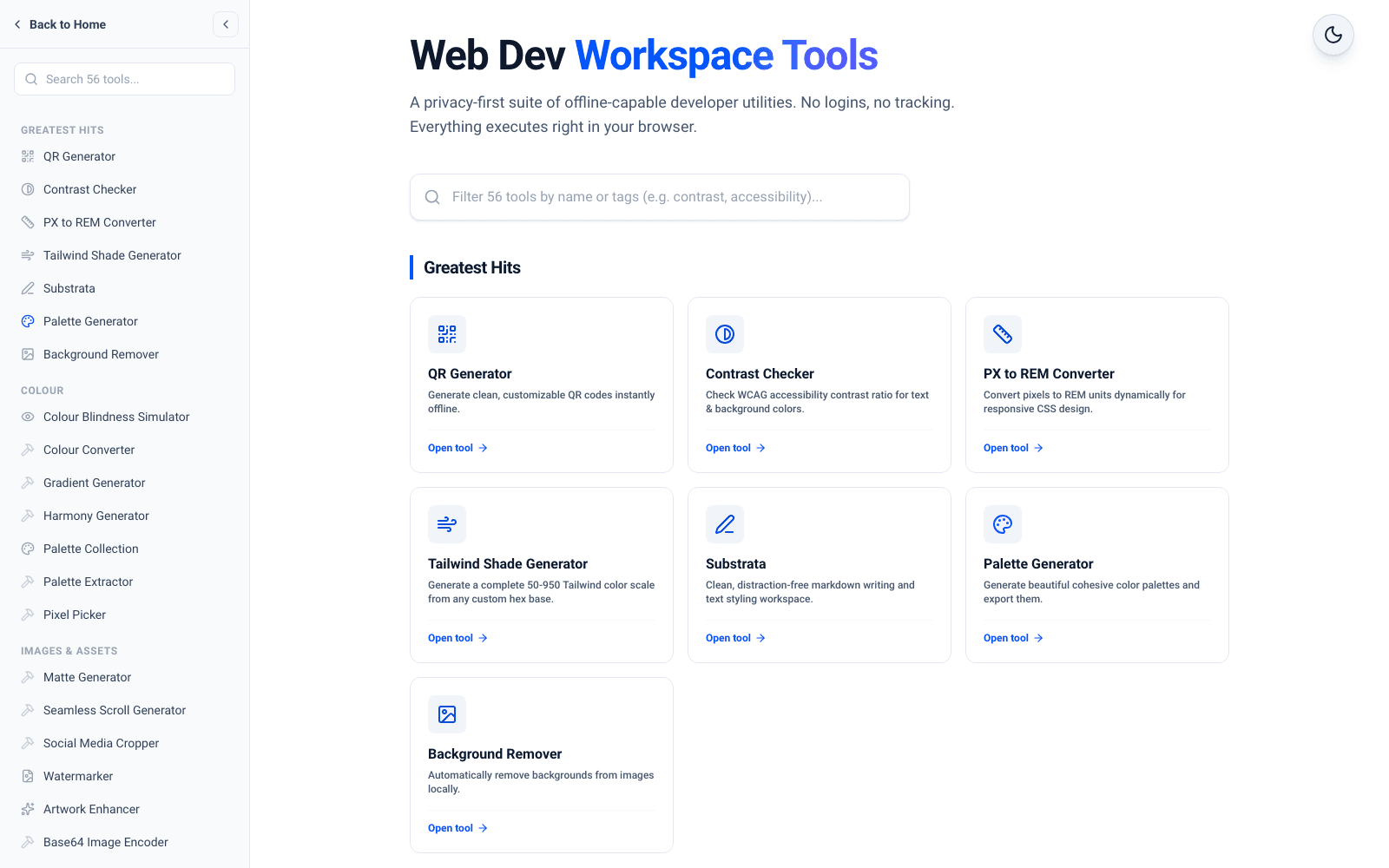
Dev Tools is a free suite of 56 developer and design utilities that run entirely in your browser: no login, no uploads, no backend doing the work. This post explains why I built it as many small tools instead of one product, how a single data file keeps 56 pages consistent, and the trade-offs of doing everything client-side.
Key takeaways
- 56 tools across colour, images, typography, print, maths and developer utilities, all free.
- Files you open in a tool are read with browser APIs like FileReader and processed on an HTML canvas or in JavaScript. They are not sent to a server.
- One typed array in lib/toolsData.ts drives the sidebar, search, sitemap, structured data and the tool count you see in this post.
- Every tool page has its own metadata, a real H1, SoftwareApplication structured data and an FAQ answering the questions people actually ask.
Why build many small tools instead of one big product?
Almost every tool started the same way. I needed something small and specific during client work: a contrast checker, a PX to REM converter, a QR code, a quick text diff. The options online were usually covered in ads, asked me to upload a file I would rather keep private, or wanted an account for a ten-second task.
So I built my own version and kept it. Small tools are easy to finish, easy to test by hand and easy to replace. None of them depends on another, so adding a new one never risks breaking an existing one. Over time that turned into a real suite, organised into categories, with a Greatest Hits set for the tools people reach for most:
- Greatest Hits: 7 tools
- Colour: 7 tools
- Images & Assets: 15 tools
- Typography & Text: 10 tools
- Print & Production: 3 tools
- Math & Calculations: 6 tools
- Developer Tools: 8 tools
What does no backend actually mean here?
It means the work happens on your device. When you open an image in the background remover, it is decoded onto an HTML canvas, and the tool makes every pixel within your chosen colour distance of the target background transparent. The image never leaves the page.
The same pattern repeats across the suite. The QR generator renders with the qrcode library onto a canvas you can download as a PNG. The barcode generator encodes Code 128 in plain TypeScript and exports an SVG. The text diff runs a longest common subsequence comparison in the browser. The Markdown tools use react-markdown with remark-gfm, and rehype-sanitize so pasted content cannot inject scripts into the page.
There are real benefits. Privacy is structural rather than a promise in a policy, because there is no server-side processing to log or leak anything. Running costs do not grow with usage, because each visitor brings their own compute. And once a tool page has loaded, the tool itself does not need to talk to a server to do its job.
One data file drives the whole suite
The most useful decision in the codebase is boring: every tool is one entry in a typed TOOLS array in lib/toolsData.ts, with a label, URL, description, category and search keywords.
Everything else reads from that list. The sidebar groups tools by category. Search filters on the label and keywords, so typing 'wcag' finds the contrast checker even though the word is not in its name. The sitemap includes every implemented tool automatically. The structured data component looks up a tool by its URL and builds SoftwareApplication JSON-LD from the same description and keywords. And TOOL_COUNT is derived by filtering that array, which is why the number in this post's title is computed rather than typed by hand.
Before that, counts and descriptions were copied into several places and drifted. An older version of this very post said 55 in one paragraph and 56 in another. Deriving the number from the data removed that whole class of mistake.
What does adding a new tool involve?
Because the shared pieces are driven by data, a new tool is mostly the tool itself. Each one lives in its own folder under the tools route with the same small set of files:
- page.tsx: the tool's interface and logic, as a client component.
- metadata.ts: a unique title, description, keywords and canonical URL.
- layout.tsx: renders the SoftwareApplication structured data for that tool's slug.
- faq.ts: the questions and answers shown on the page.
- One new entry in the TOOLS array, which makes it appear in the sidebar, search, sitemap and count.
Pure logic that is worth reusing or testing, such as the Code 128 encoder or the Shavian transliterator, sits in a shared library file instead of inside the page component. Keeping the pages thin and the logic separate makes each tool easier to read and safer to change.
The consistency is the point. A visitor who has used one tool already knows how the next one is laid out, and I can review any tool folder without having to remember how that particular one was wired.
Making every tool discoverable
For a while, many tools worked well but were nearly invisible to search engines. Several had no unique title or description, and most had styled text where a real H1 should be.
I went through all of them. Each tool now has its own metadata file with a unique title, description, keywords and canonical URL. Each page has a real H1. A layout per tool adds SoftwareApplication structured data, marked as free, so search engines and AI answer engines understand what the page is. And each tool has an FAQ file answering the questions people actually have: is it free, does it upload my files, what formats does it support.
Tools are also grouped into category hub pages, so someone looking for free colour tools or free maths tools lands on a focused page instead of one long list.
Describing what the code does, not what sounds good
The SEO pass turned into an accuracy pass. Writing an FAQ forces you to read the code and say exactly what it does, and a few descriptions had drifted from reality.
The background remover had been described as AI-powered. It is not. It uses colour-distance matching against a target colour, which works well on solid or near-solid backgrounds and poorly on busy photos. The copy now says exactly that. The barcode generator's copy had implied support for formats it never had; it now says it renders Code 128. Honest descriptions mean fewer disappointed visitors, and they are easier to maintain because they match the code.
Trade-offs and what I'd do differently
Client-side processing has limits. Large images are bound by the visitor's device memory and the canvas, and heavy work runs on the main thread, so a very large file can make a page feel sluggish while it processes. Moving the heavier image tools to Web Workers is the obvious next step.
Some tools are deliberately simple. The SVG optimiser strips editor metadata, comments and unused namespaces with targeted patterns, which handles typical exported files well but is not a full SVG parser. A couple of tools are shallower than their names suggest, and the right fix is either to make them complete or to say plainly what they do. Same rule as the copy.
If I started again, I would create the metadata, FAQ and structured data for each tool on the day the tool was built, rather than in a big pass later. Retrofitting discoverability across a whole suite takes far longer than doing it once per tool.
Try it, or get something custom built
The full suite of 56 tools is free at /tools, with no account needed. If you need a tool built for your own team or product, something private, client-side and fast, see my service packages or get in touch.